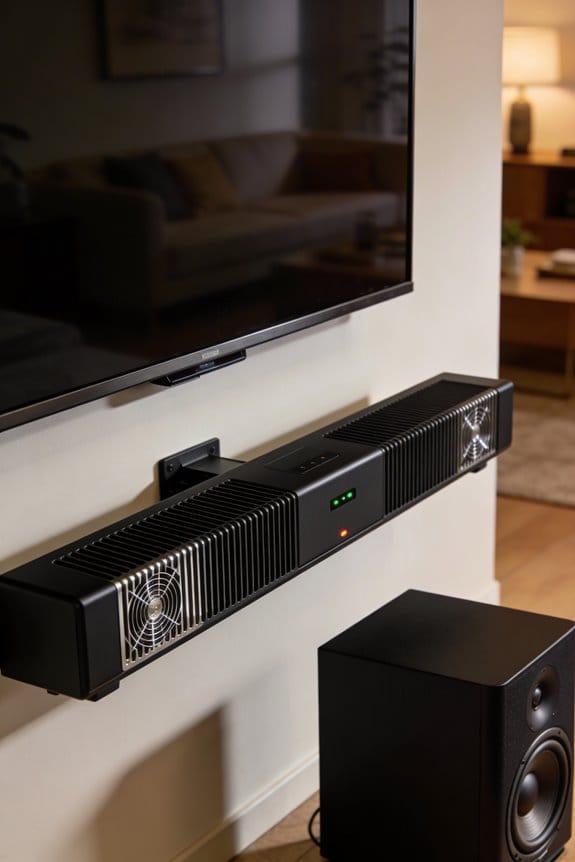

High-output active soundbars manage thermal stress through Class-D amplifiers operating at 85-90% efficiency, which convert most power into sound rather than waste heat. I recommend units with aluminum enclosures and ventilation slots for passive cooling, as they dissipate heat better than plastic designs. Multi-channel systems distribute power across drivers to reduce thermal concentration, while passive radiators extend bass without additional amplifier heat. You’ll need at least 2 inches of clearance above your soundbar for proper heat escape, and you should avoid enclosed cabinets that trap hot air. The sections below explain temperature thresholds, placement strategies, and overheating warning signs.
Key Takeaways
- High-output soundbars generate significant heat through amplifier inefficiency and multi-channel operation, requiring effective thermal management to prevent performance degradation.
- Class-D amplifiers operating at 85-90% efficiency produce less waste heat than Class-AB, making them ideal for high-output active soundbars.
- Aluminum enclosures with ventilation slots and passive radiators provide superior heat dissipation compared to plastic designs in active soundbar systems.
- Proper placement requires 2+ inches clearance above, avoiding closed cabinets, and keeping vents clear for optimal airflow and cooling.
- Overheating indicators include automatic volume reduction, distorted bass, and exterior temperatures exceeding 122°F, requiring immediate cooling and ventilation improvements.
Why Soundbars Overheat During High-Volume Use
When you crank up your soundbar to high volumes for a long time, things can start to heat up. Inside those sleek devices are amplifiers meant to turn electrical signals into sound, but they’re not perfect at it. Take the Sonos Beam2, for example—the Class-D amplifiers in it push 5 amps to drive the woofers and tweeters, which generates a good amount of heat while operating.
Now, if you’re using a multi-channel system with Dolby Atmos, the power draw gets even crazier. This leads to elevated thermal loads that can easily surpass what basic cooling solutions can handle. If you’re using a 100W active soundbar with four woofers, you might notice continuous heat from all that bass, especially if you’re extending frequencies down to 47Hz at theater levels. So, why does this matter? When you subject your soundbar to sustained high-output operation, internal components can start to feel the strain.
Here’s the trick: without proper cooling, you might experience thermal throttling, which can lower performance, and no one wants that. It often results in distortion or even potential damage to the amplifier circuits.
What Happens Inside When Amplifiers Generate Heat

Have you ever noticed how hot your soundbar can get? That heat isn’t just from the festive vibes of your movie marathons; it’s a natural byproduct of how amplifiers work. When electrical current travels through the amplifier circuits in your soundbar, components like transistors face resistance. This resistance turns a part of the energy into waste heat instead of pure sound. The situation really heats up—literally—when you crank the volume, especially in systems like the Sonos Beam2, which drives five separate channels at once. Heat tends to gather around the power transistors and other key parts that control electrical flow.
When it comes to how this heat escapes, here are a few things to understand:
- The thermal energy moves from the semiconductor junctions into nearby parts like the PCB traces and the enclosure walls.
- If you’re rocking a multi-channel Dolby Atmos setup, the power draw spreads out, giving off even more heat as the tweeters and woofers work extra hard.
- Soundbars that push 100 watts can really build up thermal loads, especially during those bass-heavy scenes at loud volumes.
- On the upside, passive radiators and smart driver designs do help reduce wasted energy in those sleek aluminum cabinets.
So, what can you do about it? Keeping your soundbar in a well-ventilated area can help. If the heat builds up too much, it might affect the performance or even shorten the lifespan. Frankly, it’s something to keep in mind while enjoying your favorite shows. Remember, a little heat is normal, but if it’s getting too hot to handle, it’s worth checking out how you’ve set it up.
In short, while some heat is expected, try to keep your soundbar comfy to make sure you’re getting the best sound possible. Have you thought about where you place your equipment?
Passive Cooling vs. Active Fans: Which Works Better?

So, have you ever wondered why your soundbar feels warm to the touch? It’s a common issue and understanding how to deal with that heat can make a big difference in performance. Passive cooling is one method that can be pretty effective without the added noise. This approach typically uses aluminum enclosures, ventilation slots, and natural convection to let heat escape quietly. It’s often enough for soundbars that are under 50W, where Class-D amplifiers generate a manageable amount of heat during regular listening.
On the other hand, if you’re dealing with a powerful sound system, like a 100W bar with multiple woofers, active fans come into play. They can really push that hot air out, but there’s a catch. The sound from those fans may be noticeable during quieter scenes, which can be a real drag when you’re trying to enjoy a movie or some music.
Here’s the trick: combining both methods is often the best move. Since 1999, Active Thermal Management systems have been mixing passive and active cooling for optimal results. For example, outdoor models like the SunBriteTV SB-SP472 rely on passive designs with sealed exteriors. They can handle extreme temperatures, from -24°F to 122°F, all thanks to how they disperse heat naturally. But if you’ve got an indoor Dolby Atmos soundbar and push it at high volumes for a long time, you might want to think about using active cooling to keep things in check.
So, which method should you choose? Honestly, it depends on your setup and how you use it. If you prefer peace and quiet while streaming, passive cooling might do the trick. But if you’re cranking up the volume at a party, active options could be the way to go.
Technologies That Reduce Soundbar Heat Output
Have you ever noticed how hot your soundbar gets while you’re enjoying your favorite shows? It’s a common problem, but there are some cool technologies out there that tackle heat at the source, instead of just trying to cool it down later.
Class-D Amplifier Efficiency
Let’s start with Class-D amplifiers, which are a staple in modern soundbars like the Sonos Beam 2. These little powerhouses use five amplifier channels to drive woofers and tweeters, and they generate much less heat compared to older models. You can expect these amps to operate at around 85-90% efficiency, which means they waste very little energy on heat.
H-PAS Bass Technology
Next up is H-PAS bass technology, found in models like the Atlantic PB-235. This tech allows it to deliver deep bass down to 47Hz with just two 4-inch woofers, so you don’t even need a subwoofer. By not relying on additional amplifiers for low-end sounds, it significantly cuts down on heat production. Imagine enjoying theater-level sound without worrying about your equipment overheating.
Thermal Dispersion Systems
For outdoor scenarios, check out soundbars like the SunBriteTV SB-SP472. They come equipped with thermal dispersion systems that help spread heat throughout aluminum enclosures, which is great if you want to use the soundbar in extreme temperatures, from -24°F to 122°F. This way, you won’t experience any performance throttling, and you can keep the good vibes going.
Signs Your Soundbar Is Overheating (And How to Fix It)
When your soundbar starts acting strange while you’re trying to enjoy your favorite tunes or movies, it’s probably a sign that things are heating up inside. Nobody wants their sound quality to take a hit just because the device is sweating it out!
Common Overheating Indicators
So, what should you keep an eye on? Here are some telltale signs that your soundbar might be in a bit of trouble:
- Automatic volume reduction when you’re cranking up the sound
- Distorted bass—yep, that murky low-end from any Class-D amplifiers
- Those frustrating shutdowns that happen after about 30-45 minutes of listening
- An exterior that’s burning hot to the touch. If it’s over 122°F, that’s a red flag.
Immediate Cooling Solutions
If you notice any of these symptoms, it’s time to act fast. Here are some easy tips to help cool things down:
- First off, turn it off for about 15-20 minutes. This gives it a chance to cool off.
- Check for any stuff like cables or decor cluttering the ventilation ports. Clear them out.
- Consider moving the soundbar out of cramped spaces. A nice, open area helps air circulate better.
- During long listening sessions, keep the volume below 80%. It’ll keep the device from working too hard.
- If overheating keeps happening, look into adding Active Thermal Management systems to your setup.
Keeping these tips in mind can help your soundbar stick around longer and perform better. What steps will you take to keep your gear cool?
Do Louder Soundbars Always Run Hotter?
Ever notice how some soundbars seem to run hotter than others, especially at high volume? It’s tempting to think that cranking up the sound means generating lots of heat, but the relationship isn’t as simple as it seems. Soundbar design plays a massive role here. If a soundbar has a smart layout with good spacing and ventilation, it can keep its cool, even when blasting your favorite tracks. Believe it or not, a 100W Class-D soundbar can run cooler than a 50W Class-AB model during those long jam sessions.
So, what really influences heat generation? Here are a few key points to consider:
- Class-D amplifiers are pretty efficient and convert around 85-90% of power into sound. This means less wasted energy and, consequently, less heat.
- Multi-channel systems like those with Dolby Atmos spread the power across different drivers, easing the stress on each individual component. Less stress equals less heat.
- If you’ve got a soundbar with passive radiators in its H-PAS designs, you’re in luck. They can extend bass down to 47Hz without adding those heat-generating active components.
- Don’t overlook impedance ratings! A soundbar with an 8-ohm setup puts less strain on the system, leading to less thermal load compared to a 4-ohm one.
So, why does this matter? Knowing how these factors work together can help you make a better choice when you’re on the hunt for a soundbar.
In the end, it’s all about the design and technology behind the device, rather than just its wattage. Keep this in mind next time you look at soundbars. What features do you think would best suit your listening needs?
Heat-Related Features to Check Before You Buy
When shopping for a soundbar, one of the last things you want to deal with is overheating. Ever had a device shut down because it got too hot? It’s frustrating. So, how do you ensure your new sound setup stays cool even during those binge-watching marathons? There are a few key features to look out for.
Start by checking the amplifier class. If it’s a Class-D amplifier, you’re in for a treat—it generates less waste heat compared to the older Class-AB designs, all while still cranking out great audio. That’s a major plus if you plan on using the soundbar for long periods.
Another thing to scrutinize is the operating temperature. Look for models that can handle temperatures above 104°F. This usually indicates that the soundbar has decent heat dissipation systems in place.
Now, power handling capacity is crucial, too. If you’ve got a small room, picking a 100W soundbar might not be the best call. It’s going to run hotter than if you chose a model that better matches your space.
Material matters, too. If the enclosure has aluminum construction, that’s a win. Aluminum does a much better job of moving heat away from the internal parts than plastic ever could.
Finally, don’t overlook the impedance rating. 8-ohm speakers tend to require less current, which means they generate less heat compared to 4-ohm configurations—especially when cranked up.
How Placement and Ventilation Affect Soundbar Temperature
Ever noticed your soundbar getting a little too hot? It’s a common problem, and the good news is that where you put your soundbar can make a big difference in how it performs. Try leaving at least 2 inches of space above the soundbar to let heat escape naturally. If you’ve got it tucked away in a closed cabinet, that’s a no-no. Doing so traps heat and makes the amplifiers work overtime, putting extra strain on the Class-D circuits that drive the woofers and tweeters.
When it comes to soundbar placement, consider these tips:
- Mount it below your TV so that rising heat can dissipate easily.
- If you’ve got an outdoor model like the SunBriteTV SB-SP472, steer clear of direct sunlight.
- Make sure vents stay clear on aluminum enclosures, especially if you have integrated wire management.
- For those 100W active soundbars with multiple woofers, letting air circulate around them is crucial, especially when you’re cranking out the bass.
So, why does all this matter? Maintaining the right temperature makes sure your soundbar runs smoothly and extends its lifespan. Those temperature dispersion systems work like a charm, allowing operation from -24°F to 122°F—just as long as you stick to the manufacturer’s spacing suggestions.
To wrap it up, proper placement and ventilation can seriously impact your soundbar’s temperature and performance. Have you paid attention to where you’ve set yours up?
Frequently Asked Questions
Can Outdoor Soundbars Handle Both Extreme Cold and Heat Simultaneously?
I’ve found that outdoor soundbars can’t face extreme cold and heat *simultaneously*, but their temperature resilience and soundbar insulation allow them to withstand wide ranges—from -24°F to 122°F—transitioning between extremes without damage.
Do Class-D Amplifiers Generate Less Heat Than Other Amplifier Types?
Yes, I’ll confirm that Class-D amplifiers are thermal champions—they’re up to 90% efficient, transforming less energy into waste heat. This superior class d efficiency makes heat management dramatically easier compared to traditional Class-A or Class-AB designs.
Will Adding a Subwoofer Increase My Soundbar’s Overheating Risk?
Adding a subwoofer won’t increase your soundbar’s overheating risk—it’ll actually reduce it. The sub handles bass reproduction independently, lowering your soundbar’s thermal load. Check subwoofer specifications for thermal efficiency to guarantee ideal heat distribution across both components.
Are Aluminum Enclosures Better Than Plastic for Heat Dissipation?
Yes, I’d recommend aluminum enclosures over plastic for heat dissipation. Aluminum’s superior thermal conductivity efficiently transfers internal heat to the surrounding air, while plastic’s insulating properties trap heat inside, potentially causing your soundbar to overheat during extended use.
Does Dolby Atmos Processing Create More Heat Than Stereo Mode?
Yes, I’ve found that Dolby Atmos generates more heat than stereo because the audio processing demands are considerably higher. Multi-channel systems require additional amplifiers and DSP calculations, increasing power draw and heat generation during operation.